
510 Battery Charging Issues: Ultimate Solutions from Basic to Complex Problems

510 Battery Charging Issues: Ultimate Solutions from Basic to Complex Problems

A dead 510 battery can ruin your vaping day. Whether your VAPORBA Duo won’t charge or your Smartpen blinks endlessly, 510 battery charging issues are frustratingly common. But don’t toss that vape battery yet—this ultimate guide covers every fix, from basic troubleshooting to complex solutions. Let’s get your vape back in action!

Why Do 510 Battery Charging Issues Happen?

The 510 battery powers your vape with its universal threading, but it’s not invincible. Charging problems can stem from dirty connections, faulty chargers, or worn-out hardware. Before diving into fixes, check out our Complete Guide to 510-Thread Batteries to understand your device better. Ready to fix vape battery not charging woes? Let’s start simple.

Basic Fixes for 510 Battery Charging Issues

Most 510 battery charging issues have quick solutions. Try these first:

  • Check the Power Source: Plug your charger into a different USB port or wall outlet. A weak source can trick you into thinking there’s a problem.
  • Inspect the Cable: Swap out the USB cable. A frayed or incompatible cord (like a fast-charging phone charger) can fail your vape battery.
  • Clean the Connection: Oil or dust in the 510 threading can block charging. Use a cotton swab with rubbing alcohol to wipe the battery and charger contacts clean.

Still no luck? Our Troubleshooting My 510-Thread Battery Charging Issues post offers more beginner-friendly tips.

Intermediate Fixes: Digging Deeper

If basic steps don’t fix vape battery not charging, it’s time to troubleshoot further:

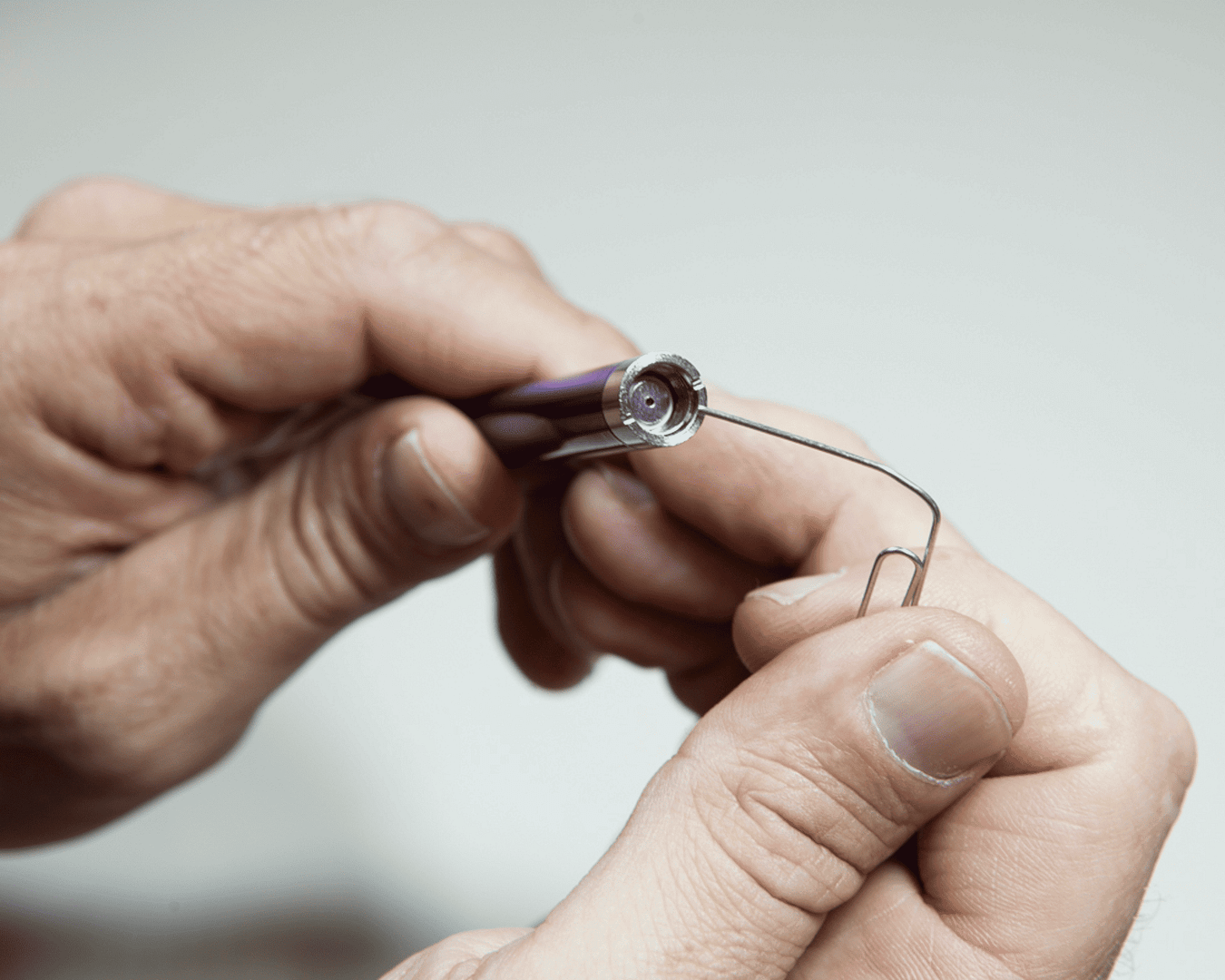
  • Adjust the Center Pin: Overtightening a cartridge can push the battery’s center pin down, breaking the charging connection. Gently lift it with a paperclip—carefully!
  • Test the Charger: Screw your VAPORBA Celare or Duo onto a different charger. If it works, your original charger’s toast.
  • Look for Indicator Lights: Most 510 batteries (like the Smartpen) flash red while charging and turn green when full. No lights? The battery or charger might be defective.

For more on maintenance, see How to Maintain 510 Batteries.

Complex 510 Battery Charging Issues and Solutions

When simple and intermediate fixes fail, you’re facing trickier 510 battery charging issues. Here’s how to tackle them:

  • Overheating Damage: If your battery gets hot during use, it might not charge properly. Let it cool, then charge with a 5V USB (no fast chargers!). Persistent heat? Replace it.
  • Battery Lifespan: Lithium-ion batteries degrade after 6–12 months of heavy use. If your Duo’s 650mAh won’t hold a charge, it’s time for a new one from VAPORBA’s 510 Batteries page.
  • Short Circuits: A blinking light with no charge could mean a short. Unscrew the cartridge, clean all contacts, and test again.

Preventing 510 Battery Charging Issues

Avoid future headaches with these pro tips:

  • Use the right charger (5V, no rapid charging) every time.
  • Store your battery away from heat or moisture—think VAPORBA Celare on a cool shelf.
  • Don’t overcharge—unplug once the light turns green.

When to Replace Your Vape Battery

If you’ve tried everything and still can’t fix vape battery not charging, it’s likely kaput. Grab a reliable replacement like the VAPORBA Duo for its dual-cartridge power or the sleek Smartpen. Shop now at VAPORBA.

Final Thoughts

From dirty pins to dead cells, 510 battery charging issues don’t have to end your vaping. This ultimate guide arms you with solutions for every problem—basic to complex. Fixed your battery? Tell us how in the comments, or share this with a friend stuck on a dead vape!

Leave a Comment

Your email address will not be published. Required fields are marked *


Shopping Cart